Iterable input data
OntoWeaver iterates over input data, and creates nodes and edges at each steps.
The simplest example of iterable data is a table, which OntoWeaver will consume line by line, creating node(s) and edge(s) at each step.
However, technically, OntoWeaver can consume any iterable data, providing that it has an “Adapter” class knowing how to do it.
The more generic adapters run a query on a data file, which issue a set of iterable data. For instance, you can run a XPath query on an XML document, or a JMESPath query on a JSON file.
For a basic usage through the ontoweave command, OntoWeaver will guess the
input data type from the input file extension. Then, it will read the
element (i.e. the same as column) sections of the mapping as an input
query. In several query language, using a matching string already works. Thus,
for simple queries, you should not have much to do to consume a data file of a
supported type.
The following sections show the available input data adapters.
Tabular data
Tables being the most ubiquituous data structure, they are used as the main example across OntoWeaver documentation, as you may have seen in the previous sections.
The basic processing of a table is to iterate over each row, and map from column names to element types.
Tables can be in any format that Pandas can read. The automatic input data type detection can handle the following formats/extensions: csv, tsv, txt, xls, xlsx, xlsm, xlsb, odf, ods, odt, json, html, hdf, feather, parquet, pickle, orc, sas, spss, stata.
Simple tables being the most common data format, we use it for all examples in the Mapping API section.
Web Ontology data
Existing Semantic Knowledge Graphs are often distributed in files containing the taxonomy of types, some logical predicates for reasonning and the graph of individual instances itself. These files are called “ontologies”, and come in various formats and dialects. The de facto standard for ontologies is the Web Ontology Language ( OWL, a superset of RDF).
Just as BioCypher can read a taxonomy from an ontology file, OntoWeaver can iterate over the graph of individuals in an ontology file, and import them as pieces of data.
Note
Biocypher incorrectly calls a taxonomy defined in an ontology file “an ontology”, for the sake of simplicity.
It may be confusing to have a clear view of how to handle ontology files. They can host both the taxonomy (the “type labels”) and a data graph. As shown in the diagram below, the data parts are handled by OntoWeaver, while the taxonomy part is handled by BioCypher.
What’s confusing is that you may have to use the taxonomy from an ontology file, but not its instances graph (it may not even have one!). And you may even have to combine data from tabular files and an ontology’s instance graph, while also combining the taxonomies of several ontology files.
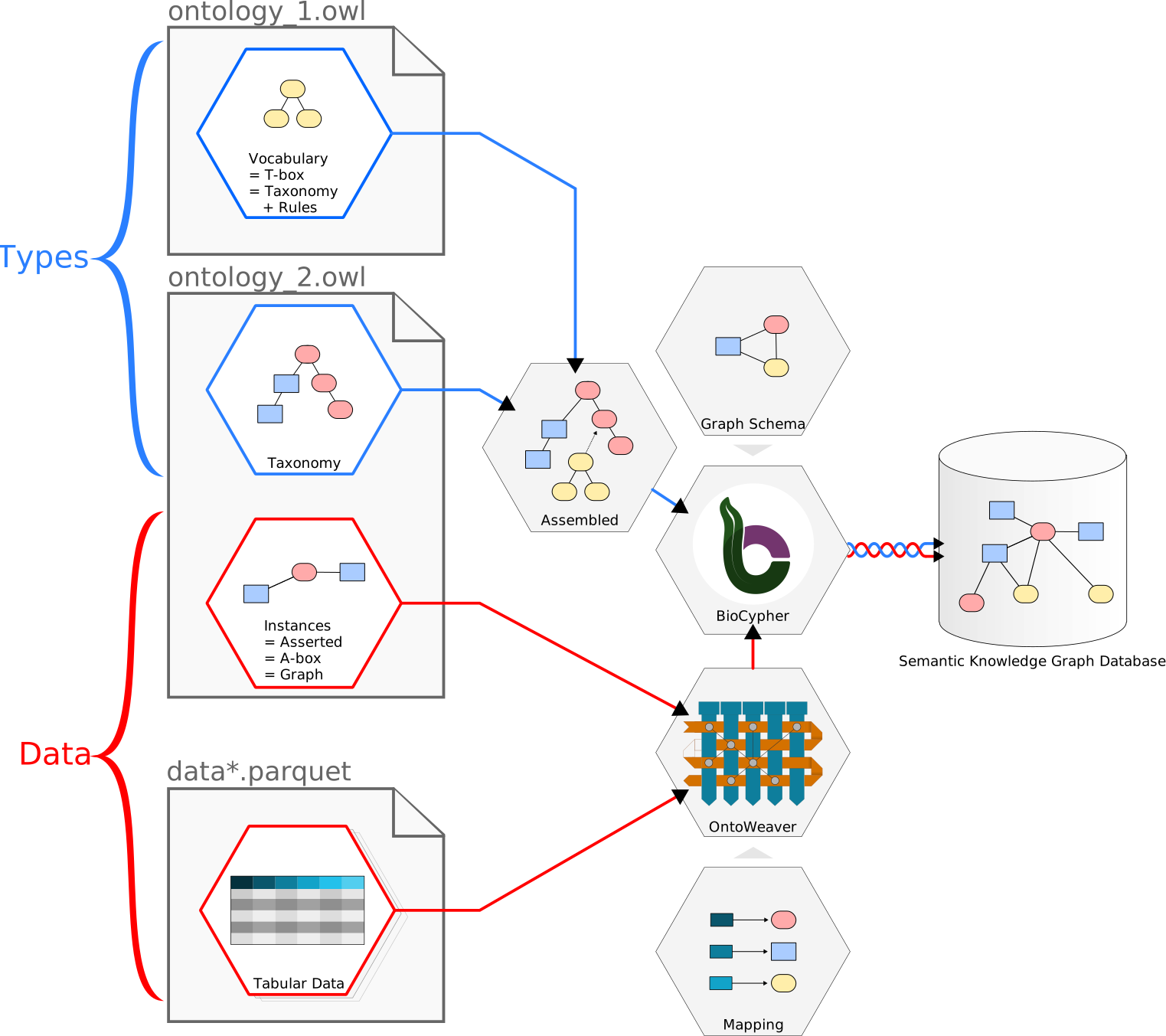
A diagram showing the paths of types and data in an OWL file, across OntoWeaver and BioCypher.
Note
Ontologies specialists have specific terms for different parts of an ontology file. You may encounter “T-box” or “vocabulary”, which means the taxonomy along with a set of logical rules.
The “A-box” in an ontology file is the set (or “population”) of “instances” (or “individuals”), which in BioCypher is just called a “graph”.
For ontology specialists: OntoWeaver can import RDF triples which predicate is
owl:NamedIndividual.
OntoWeaver can read ontology files written in the RDF dialects that RDFlib can read: owl, xml, n3, turtle, ttl, nt, trig, trix, json-ld.
OWL & automap
The simplest way to read the input data from an ontology file is to use
the automatic OWL adapter.
This adapter can be used by passing the automap keyword in place of a mapping
file into the ontoweave command, or the weave function:
ontoweave my_ontology.ttl:automap
This will automatically map the individuals defined into the input graph found
in the ontology file to the types found in the taxonomy of the same ontology
file.
Using this OWLAutoAdapter, you thus don’t need to define a mapping, it will
be automatically extracted from the input ontology file.
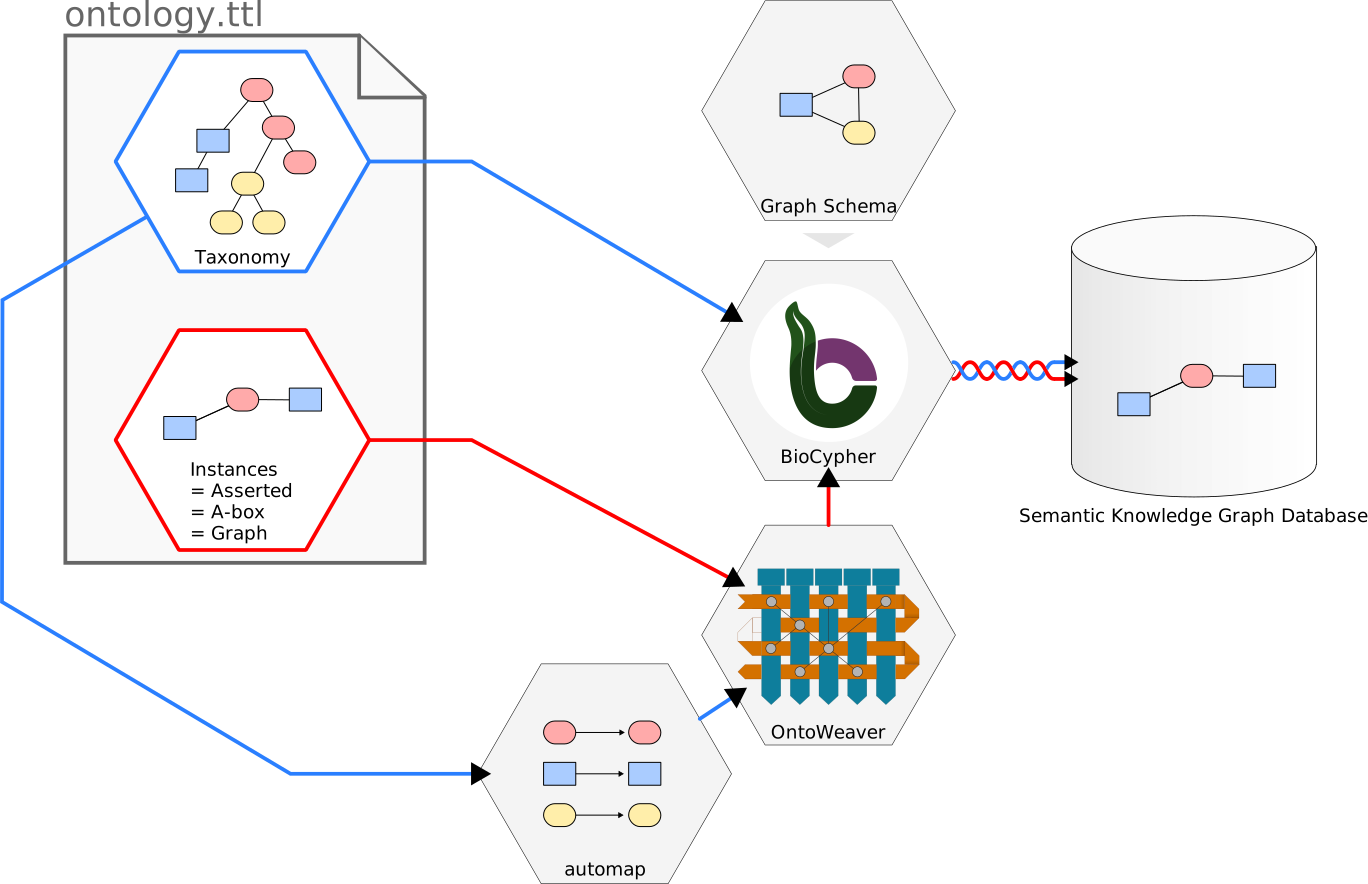
The automap feature uses the same taxonomy for building up the SKG (through BioCypher) and for defining the mapping (through OntoWeaver). It thus creates a one-to-one mapping of the data (the SKG within the OWL file, in red).
Of course, this adapter will expect that the classes defined in the input ontology exist in the taxonomy configured by BioCypher.
Note
BioCypher allows to assemble several taxonomies into a single one. This configured taxonomy should have the types that the graph loaded by OntoWeaver is using, or else a missing type error will occur. For instance, if you use a root type that’s not the root of a (sub)taxonomy, a (possibly large) part of the (sub)taxonomy will be ignored by BioCypher, and thus invisible to OntoWeaver’s extracted graph.
Warning
This adapter cannot handle individuals inheriting from multiple classes,
it will also ignore individuals not having rdf:type of an owl:Class
and without owl:NamedIndividual.
Mapping OWL
In some cases, you may want to change the types of some elements of a graph stored in an OWL file.
With OntoWeaver, you can use a mapping file to change the types (classes, in OWL) of the nodes (instances, in OWL) or edges (object properties, in OWL) included in the graph within the OWL file, and make them match the ones of the desired taxonomy in the output graph.
In most cases, you just need to define your mapping and use it on an OWL file:
ontoweave my_ontology.ttl:my_mapping.yaml
In the mapping, you need to indicate which element of the
owl:NamedIndividual you are using, with the element keyword, and to
what you want to map it.
Note
The element keyword in a mapping is just a synonym for column.
This allows for a mapping file which is more readable to someone used
to reading OWL ontologies.
In practice, both keywords will work exactly the same.
Usually, you will want to map some “named individuals” as a subject, and then map “object properties” via a relation.
Warning
Do not confuse OWL’s “object property” with OntoWeaver’s “property”.
The term owl:ObjectProperty in your “populated” ontology refers to
what OntoWeaver calls “edges”.
What OntoWeaver calls a “property” is referred by OWL as the term
owl:DataProperty.
If you need to call the adapter yourself, use the OWLAdapter class.
OWL Example
Example of mapping working with an OWL file:
subject:
    map: # the subject is any OWL named individual...
        id_from_element: label
        match_type_from_element: type # which RDF type is...
        match:
            - source:
                to_subject: source
            - target:
                to_subject: target
transformers:
    - map: # an ObjectProperty to another NamedIndividual:
        element: link
        to_object: target
        via_relation: link
    - map: # a property:
        element: prop
        to_property: prop
This mapping will extract the named individuals from the following OWL ontology file (here in the Turtle syntax):
@prefix : <http://fake.onto#> .
@prefix owl: <http://www.w3.org/2002/07/owl#> .
@prefix rdf: <http://www.w3.org/1999/02/22-rdf-syntax-ns#> .
@prefix rdfs: <http://www.w3.org/2000/01/rdf-schema#> .

:thing a owl:Class ;
        rdfs:label "thing" .

:source a owl:Class ;
        rdfs:subClassOf :thing ;
        rdfs:label "source" .

:target a owl:Class ;
        rdfs:subClassOf :thing ;
        rdfs:label "target" .

owl:ObjectProperty rdfs:subClassOf owl:thing .

:link a owl:ObjectProperty ;
        rdfs:subClassOf :thing ;
        rdfs:label "link" .

:prop a owl:DataProperty ;
        rdfs:subClassOf :thing ;
        rdfs:label "prop" .

:S0 a :source ;
        a owl:NamedIndividual ;
        rdfs:label "S0" ;
        :link :T0 .

:T0 a :target ;
        a owl:NamedIndividual ;
        rdfs:label "T0" ;
        :prop "data property" .
JavaScript Object Notation (JSON)
JSON data is ubiquituous in Web APIs. To extract data from JSON files, OntoWeaver uses the JMESPath query language.
JMESPath is a mature query language that is well defined and documented, simple queries are intuitive, and accessing iterable data is easy. It also allows slicing, filtering data and multiselection of lists. You will learn more by looking at the JMESPath tutorial.
JSON Example
You will most probably want to extract data from a JSON list, which means you will just need to understand the wilcard expression.
Imagine that you have the following JSON document, containing a table:
{
    "data": [
        {"variant": 0, "patient": "A", "age": 12 },
        {"variant": 1, "patient": "B", "age": 23 },
        {"variant": 2, "patient": "C", "age": 34 }
    ]
}
To extract its data with OntoWeaver, you can use the following mapping:
row:
   map:
       element: data[*].variant
       to_subject: variant
transformers:
    - map:
        element: data[*].patient
        to_object: patient
        via_relation: patient_has_variant
    - map:
        element: data[*].age
        to_property: age
        for_object: patient
Note how the wilcard expression [*] will return all matching elements,
hence building an iterable data set. Right in the mapping, you can use filters,
for instance by using element: data[?age > 18].age.
To work with more complex data (for instance nested data), you will want to learn more about multi-select lists, for which the tutorial have some examples.
Extensible Markup Language (XML, HTML…)
XML data formats are ubuiquitous to word processors, and the Web in general (for instance: HTML, ODF, DOCX are all XML dialects). To extract XML data, OntoWeaver uses the ElementTree XPath query language, which is a small extension on top of the XPath Web standard.
HTML Example
You will most probably want to extract data from tables encoded as nested XML tags, which means you will just need to understand localization paths and numerical predicates.
Imagine that you have the followimg HTML page, containing a table:
<body>
    <table>
        <caption>Friends</caption>
        <thead>
            <tr><th>variant_id</th><th>patient</th><th>age</th></tr>
        </thead>
        <tbody>
            <tr><td>1</td><td>B</td><td>12</td></tr>
            <tr><td>0</td><td>A</td><td>23</td></tr>
            <tr><td>2</td><td>C</td><td>34</td></tr>
        </tbody>
    </table>
<body>
To extract its data with OntoWeaver, you can use the following mapping:
row:
   map:
       element: /body/table/tbody/tr/td[1]
       to_subject: variant
transformers:
    - map:
        element: /body/table/tbody/tr/td[2]
        to_object: patient
        via_relation: patient_has_variant
    - map:
        element: /body/table/tbody/tr/td[3]
        to_property: age
        for_object: patient
Note that XPath also allows filtering.